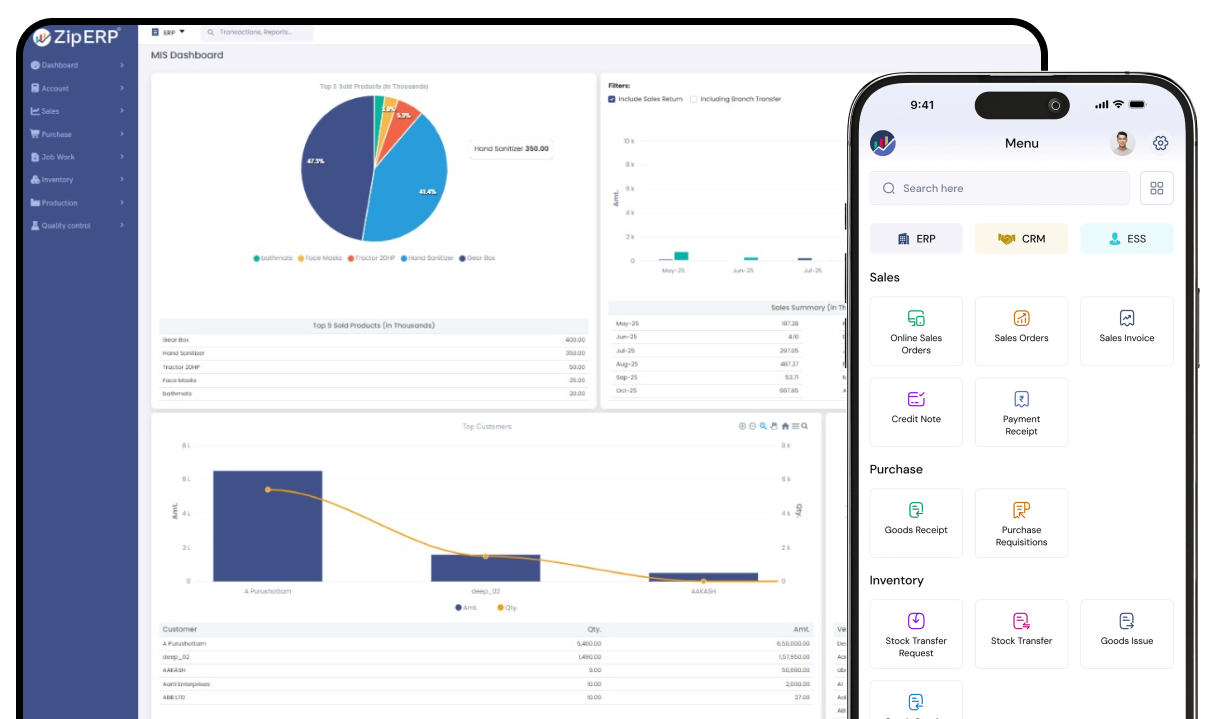
Cloud-based ERP software brings these business functions together in one system. It allows authorized users to access shared business information through the internet while the ERP provider manages much of the underlying infrastructure.
For businesses evaluating ERP solutions in India, the important question is not simply whether cloud ERP is modern technology. The better question is whether the software fits the company’s processes, industry, users, locations, compliance requirements, budget, and future growth.
What Is Cloud-Based ERP Software?
Cloud-based ERP software is an enterprise resource planning system hosted on cloud infrastructure and accessed through the internet. It connects core business functions such as finance, sales, purchasing, inventory, manufacturing, HR, and reporting within a centralized system.
Unlike traditional on-premise ERP, businesses do not normally need to maintain the ERP infrastructure on their own premises. The deployment model can reduce the amount of hardware and infrastructure management handled internally, although businesses still need to manage users, processes, data, integrations, and vendor relationships.
ERP itself is designed to integrate business processes and information into one system. Cloud ERP applies that ERP model through cloud-based delivery.
How Does Cloud ERP Software Work?
A typical cloud ERP environment works through several connected components:
- Cloud infrastructure: The ERP application and associated data are hosted on cloud infrastructure.
- Internet access: Authorized users access the system through supported browsers or applications.
- Centralized data: Business transactions are recorded in a shared database or integrated data environment.
- User permissions: Administrators can control what different users or departments can access.
- Business workflows: Transactions can move between departments according to configured processes.
- Reporting: Management can use centralized data for operational and financial reports.
For example, when a sales order is entered, the information can be used by inventory, purchasing, production, dispatch, and finance teams without requiring each department to maintain a separate copy of the transaction.
Web-Based ERP vs. Cloud-Based ERP: What Is the Difference?
The terms web-based ERP and cloud-based ERP are closely related, but they describe different aspects of software.
A web-based ERP primarily describes how users access the application, usually through a web browser. A cloud-based ERP describes where and how the application is hosted and delivered. A cloud ERP can therefore be web-based, but the terms are not technically identical.
| Factor |
Web-Based ERP |
Cloud-Based ERP |
| Primary meaning |
Browser-based access |
Cloud deployment and hosting |
| Access |
Usually through a browser |
Usually through internet-connected devices |
| Local installation |
Often limited or unnecessary |
Usually not required for the core application |
| Infrastructure |
Depends on deployment model |
Cloud infrastructure |
| Remote access |
Common |
Common |
| Maintenance |
Depends on provider and deployment |
Typically handled largely by the provider |
| Scalability |
Depends on architecture |
Cloud infrastructure is generally designed for scalable resource use |
When comparing a web based ERP software solution in India, businesses should therefore ask not only whether the software works through a browser, but also where it is hosted, who manages infrastructure, how backups work, and how the platform scales.
Why Are Indian Businesses Considering Cloud ERP?
Indian businesses can have complex operating requirements, particularly when they manage multiple branches, warehouses, sales channels, suppliers, or production activities.
Common challenges include:
- Manual data entry
- Multiple spreadsheets
- Separate software for different departments
- Inconsistent inventory information
- Delayed financial reporting
- Limited visibility across locations
- Repetitive administrative work
- Difficulties coordinating sales, purchasing, inventory, and finance
- Increasing transaction volumes as the business grows
Cloud ERP can bring these activities into a connected environment.
Indian ERP buyers should also consider local business requirements such as GST-related processes, invoicing, tax reporting, multi-location operations, and integrations with other business applications.
Key Features of Cloud-Based ERP Software
The right feature set depends on the company’s industry and processes. However, most businesses evaluating cloud ERP should review the following areas.
Finance and Accounting
Finance functionality can bring accounting and operational transactions into one system.
Depending on the ERP, finance capabilities may include:
- General ledger
- Accounts payable
- Accounts receivable
- Invoicing
- Expense management
- Payment tracking
- Financial reporting
- Tax-related workflows
- Budgeting
- Bank-related processes
The value comes from connecting financial information with operational transactions rather than maintaining separate records.
Sales and CRM
Sales and CRM functionality can help businesses manage:
- Leads
- Customer records
- Quotations
- Sales orders
- Follow-ups
- Customer transactions
- Sales reporting
When sales information is connected with inventory and finance, teams can work from a shared view of customer activity.
Inventory and Warehouse Management
Inventory is often one of the most important ERP functions for businesses dealing with physical products.
Useful capabilities may include:
- Stock tracking
- Warehouse management
- Stock transfers
- Reordering
- Batch or serial tracking where required
- Inventory valuation
- Purchase and sales stock updates
- Multi-location inventory visibility
For businesses operating multiple warehouses, centralized inventory information can help reduce discrepancies between departments.
Purchase and Vendor Management
ERP purchasing functionality can connect procurement with inventory, suppliers, finance, and production.
Typical capabilities include:
- Purchase requisitions
- Purchase orders
- Vendor records
- Purchase invoices
- Supplier pricing
- Approval workflows
- Purchase reporting
This can help businesses maintain a clearer connection between what they need to purchase, what they have ordered, and what they have received.
Manufacturing and Production
Manufacturing businesses may require more specialized ERP capabilities.
These can include:
- Bill of materials
- Production planning
- Material requirements
- Work orders
- Production tracking
- Raw material consumption
- Finished goods
- Production costing
- Quality-related processes
The exact functionality required depends heavily on whether the business operates discrete manufacturing, process manufacturing, job production, or another production model.
HR and Payroll
Businesses with larger teams may also integrate HR and payroll processes into their ERP environment.
Depending on the solution, this can include:
- Employee records
- Attendance
- Leave management
- Payroll
- Employee expenses
- Department management
- Reports
- Approval workflows
Integration can reduce the need to maintain employee information across disconnected systems.
Reporting and Analytics
ERP reporting turns transaction data into information that management can use.
Examples include:
- Sales reports
- Purchase reports
- Inventory reports
- Financial reports
- Customer reports
- Production reports
- Outstanding reports
- Department-wise performance reports
The most useful ERP reporting is not simply a collection of charts. It should help decision-makers answer practical questions about sales, cash flow, stock, purchasing, production, and business performance.
Workflow Automation
Workflow automation can reduce repetitive manual steps.
For example, a company could configure an approval process for a purchase order:
Purchase Request → Approval → Purchase Order → Receipt → Invoice → Payment
The exact workflow depends on the organization’s policies.
Integration and APIs
ERP software rarely operates completely alone.
Businesses may need integrations with:
- Banking systems
- E-commerce platforms
- Payment systems
- CRM applications
- Payroll systems
- Shipping platforms
- Manufacturing equipment or systems
- Business intelligence tools
- Communication platforms
Before selecting cloud ERP, identify which existing systems need to exchange data with the ERP.
Role-Based Access
ERP systems contain sensitive operational and financial information.
Role-based access allows businesses to control what different users can view or modify.
For example:
- Sales users may access customer and sales information.
- Warehouse users may access inventory transactions.
- Finance users may access accounting information.
- Managers may access reports across departments.
Access controls should be reviewed carefully during implementation.
Benefits of Cloud ERP for Indian Businesses
Access Business Information Remotely
Because cloud ERP is accessed through internet-connected devices, authorized employees can work with business information without being tied to a specific office server.
This can be particularly useful for businesses with multiple branches, sales teams, warehouses, or distributed management.
Centralize Business Operations
Cloud ERP can bring finance, sales, inventory, purchasing, manufacturing, HR, and other functions into one connected environment.
Instead of maintaining separate records, departments can work with shared information.
Improve Data Visibility
A centralized ERP can provide management with more timely access to operational information.
For example, management may be able to review:
- Current inventory
- Open sales orders
- Pending purchases
- Outstanding customer payments
- Supplier payments
- Production status
- Financial reports
The quality of these insights depends on accurate data and properly configured processes.
Reduce Repetitive Data Entry
When systems are integrated, information entered in one process can flow into related processes.
For example, a confirmed sales order can update relevant inventory and fulfillment workflows without requiring every department to manually recreate the same information.
Support Business Growth
A growing business may add:
- Employees
- Products
- Customers
- Warehouses
- Branches
- Transactions
- Production capacity
The ERP should be capable of handling this growth without forcing the company to replace the system prematurely.
Simplify Infrastructure Management
With a cloud deployment model, the provider generally manages much of the underlying hosting infrastructure, maintenance, and system updates.
This can reduce the infrastructure responsibilities that would otherwise fall on the company’s internal IT team.
Are There Any Limitations of Cloud ERP?
Cloud ERP offers significant advantages, but it is not automatically the right choice for every business.
Internet Dependency
Cloud applications generally depend on reliable internet connectivity. Businesses should consider their connectivity, backup connectivity, and operational requirements.
Implementation Takes Planning
Moving from spreadsheets or legacy systems to ERP involves more than installing software.
Businesses need to define processes, clean data, configure workflows, test transactions, and train employees.
Data Migration Can Be Complex
Historical data may exist in spreadsheets, accounting systems, databases, or legacy applications.
Before migration, businesses should determine:
- What data must be migrated
- What data should be archived
- Which records need cleaning
- How duplicate records will be handled
- How historical information will be validated
Customization Can Add Complexity
Businesses often want ERP software to reproduce every existing process. Excessive customization can make implementation and future maintenance more difficult.
A better approach is to distinguish between:
- Processes that are essential
- Processes that can be standardized
- Processes that need configuration
- Processes that genuinely require customization
Vendor Dependency
Cloud ERP creates an ongoing relationship with the software provider.
Businesses should therefore review:
- Service terms
- Support arrangements
- Data ownership
- Data export options
- Backup policies
- Security controls
- Update policies
- Integration capabilities
Cloud ERP vs. Traditional On-Premise ERP
Both deployment models can support ERP functionality, but they differ in how infrastructure and maintenance are handled.
| Factor |
Cloud ERP |
On-Premise ERP |
| Hosting |
Cloud infrastructure |
Company-controlled infrastructure |
| Hardware |
Usually managed by provider |
Usually managed by business |
| Remote access |
Generally available |
Depends on setup |
| Updates |
Typically provider-managed |
Typically business-managed |
| Infrastructure maintenance |
Mostly provider responsibility |
Business responsibility |
| Initial infrastructure investment |
Usually lower |
Can be higher |
| Customization |
Depends on platform |
Often highly configurable |
| IT responsibility |
Reduced infrastructure burden |
Greater infrastructure responsibility |
| Scalability |
Can scale with cloud resources and plan |
Requires infrastructure planning |
| Vendor dependency |
Higher |
Varies |
The right choice depends on the organization’s technical capabilities, control requirements, security policies, budget, and operating model.
What Should Indian Businesses Look for in Cloud ERP Software?
Choosing ERP software should start with business requirements rather than a list of features.
1. Industry Fit
Manufacturing, retail, distribution, pharmaceuticals, services, construction, and other industries can have different workflows.
The ERP should support the processes that matter to the business.
2. Scalability
Ask whether the system can accommodate:
- More users
- More transactions
- Additional branches
- More warehouses
- New products
- New business processes
3. Indian Business Requirements
Review whether the software supports the tax, accounting, invoicing, reporting, and operational workflows relevant to your organization.
For GST and other regulatory requirements, confirm the specific functionality with the vendor and your accounting or tax advisor.
4. Security and Access Controls
Ask the vendor about:
- User authentication
- Role-based access
- Data encryption
- Backup procedures
- Monitoring
- Access logs
- Data recovery
- Security responsibilities
Do not evaluate security based only on marketing language. Ask for specific information about how the system and infrastructure are protected.
5. Integration Capabilities
Determine whether the ERP can integrate with your existing software.
Ask:
- Is there an API?
- What integrations are available?
- Can data be imported and exported?
- Are integrations maintained after software updates?
6. Reporting
Review the actual reports your managers use today.
Then determine whether the ERP can reproduce them or provide better alternatives.
7. Customization and Configuration
Look for a practical balance between standardization and flexibility.
The software should adapt to genuine business requirements without making every workflow dependent on custom development.
8. Implementation and Support
Ask:
- Who manages implementation?
- How is data migrated?
- What training is provided?
- How are issues handled?
- Is post-launch support available?
- What is the escalation process?
9. Total Cost of Ownership
Do not compare vendors only on subscription price.
Consider:
Software + Users + Modules + Implementation + Migration + Customization + Integrations + Training + Support
The lowest initial price may not represent the lowest overall cost.
10. Vendor Stability and Product Roadmap
ERP becomes part of a company’s operational infrastructure.
Review the vendor’s:
- Product development approach
- Support capabilities
- Implementation experience
- Update process
- Integration ecosystem
- Long-term product direction
How Much Does Cloud ERP Software Cost in India?
There is no single price for accounting because the total cost depends on the business and implementation requirements.
Common pricing factors include:
- Number of users
- Modules required
- Number of locations
- Transaction volume
- Customization
- Integrations
- Data migration
- Implementation services
- Training
- Support requirements
Some providers use subscription pricing, while others may structure costs around users, modules, implementation services, or customized deployments.
When comparing proposals, ask vendors to provide a complete breakdown rather than comparing only the monthly or annual software fee.
How to Implement Cloud ERP Successfully
A structured implementation can reduce disruption and improve adoption.
Step 1: Identify Business Requirements
Document the company’s current processes and problems.
Start with questions such as:
- Where are errors occurring?
- Which processes are manual?
- Which reports take too long to prepare?
- Where does duplicate data exist?
- Which departments need better coordination?
Step 2: Map Existing Processes
Document the flow of important transactions.
For example:
Lead → Quotation → Sales Order → Inventory → Dispatch → Invoice → Payment
Do the same for purchasing, production, expenses, and other core processes.
Step 3: Select the Required Modules
Do not purchase functionality simply because it exists.
Identify which modules are essential now and which may be required later.
Step 4: Prepare the Data
Clean and validate customer, supplier, product, inventory, financial, and other master data before migration.
Step 5: Configure the System
Configure:
- Users
- Roles
- Workflows
- Approval processes
- Reports
- Tax-related settings
- Business rules
Step 6: Integrate Existing Systems
Connect the ERP to systems that need to exchange information.
Step 7: Test Real Business Scenarios
Testing should use realistic transactions.
For example:
Quotation → Sales Order → Stock Allocation → Dispatch → Invoice → Payment
Testing the complete workflow is more useful than testing each module independently.
Step 8: Train Employees
Training should focus on actual employee responsibilities rather than every available feature.
Step 9: Go Live
Move to production after completing testing, data validation, user training, and operational preparation.
Step 10: Monitor and Improve
After launch, review:
- User adoption
- Data accuracy
- Workflow issues
- Reports
- Integration performance
- Support requests
ERP implementation should be treated as an ongoing business improvement process rather than a one-time software installation.
Is Cloud ERP Suitable for Small and Medium-Sized Businesses?
Cloud ERP can be suitable for small and medium-sized businesses when the organization has enough operational complexity to benefit from integrated business management.
It may be worth evaluating when a business has:
- Multiple departments
- Growing transaction volumes
- Inventory management requirements
- Multiple locations
- Manufacturing processes
- Complex purchasing
- Growing sales operations
- Increasing reporting needs
- Too many disconnected applications
- Heavy dependence on spreadsheets
A smaller business with very simple operations may not need a full ERP system yet. The decision should be based on process complexity and future requirements rather than company size alone.
How to Choose a Cloud ERP Vendor in India
Before selecting a vendor, create a structured evaluation scorecard.
Cloud ERP Vendor Evaluation Checklist
| Evaluation Area |
Questions to Ask |
| Business fit |
Does the ERP support our core processes? |
| Industry fit |
Does it support our industry requirements? |
| Modules |
Do we have the modules we need? |
| Scalability |
Can it support future growth? |
| Security |
What controls protect our business data? |
| Access |
Can we control access by role and department? |
| Integration |
Can it connect with our existing systems? |
| Reporting |
Can it provide the reports management needs? |
| Customization |
Can the system adapt without excessive development? |
| Migration |
How will existing data be migrated? |
| Implementation |
Who will manage the implementation? |
| Training |
What training will users receive? |
| Support |
What support is available after launch? |
| Pricing |
What is the complete cost? |
| Data |
Can we export our data if required? |
Ask shortlisted vendors to demonstrate actual business scenarios rather than giving only a generic product presentation.
For example, a manufacturing business could ask the vendor to demonstrate:
Purchase → Material Receipt → Inventory → Production → Finished Goods → Sales → Dispatch → Invoice
This provides a much better basis for comparison than simply reviewing a feature list.
Conclusion
Cloud-based ERP software can help Indian businesses connect finance, sales, purchasing, inventory, manufacturing, HR, reporting, and other business processes through a centralized system.
However, selecting the right ERP is not simply about choosing the software with the largest number of features. Businesses should evaluate process fit, industry requirements, scalability, security, integrations, implementation, support, data migration, and total cost.
A web-based ERP software solution in India can be particularly useful for organizations that need browser-based access to centralized business information across departments or locations. Before making a decision, businesses should map their current processes, identify their future requirements, compare suitable vendors, and test the workflows that matter most to their operations.
For businesses considering cloud ERP solutions, the best starting point is a clear understanding of what the organization needs the ERP to solve today and what it will need to support as the bus